Articles by "Photo Editor"
18+ Only Activator Adobe Flash Player Android Android Applications Android Games Android Root Tools Android ႏွင့္ ျမန္မာFont Apk Anti Porn Antivirus Article Auto News Bluestacks Root Browser Burning CCleaner Comedy Converter မ်ား crack Crime Crime News CWM Dictionary Download Drama Driver DVD Ebook Entertainment Facebook fonts Foreign News Game Review Games Games News Global News GPK Hacking Hide Folder How to HTML Internet Download Manager IOS IP Hide ISO App IT Ebook IT KNOWLEDGES IT News jailbreak 7.0.4 jailbreak 7.0.6 jailbreak Tools Journal Latest News Linux Local News Magazine Medical Medical Applications Medical Ebook Microsoft Office မ်ား Mobile News Mobile Review Money Making Tips Movie Movie Review Musical Nero Burning Network News Notepad Partition Manager PDF Photo Editor Photoshop software Playboy players plugin Premium Proxy Printer Racing Recovery root Serial Keys Skin Pack Skype Slide Show Movie Maker Slider Show Software Sport System Cleaner Thriller Toolkit Trojan Remover Uninstaller USB Security Useful Applications Viber Video Converter Video Editing Webcam Website Designer WiFi WiFi Hack Live CD Windows Windows Manager WinRAR စာအုပ္မ်ား နည္းလမ္းမ်ား ဗဟုသုတ ျပကၡဒိန္ ျမန္မာ့ စစ္တုရင္ ျမန္မာစာတန္းထိုးဇာတ္လမ္းမ်ား ျမန္မာႏိုင္ငံ၏ လက္ရွိ အေျခအေန ရုပ္ရွင္ သတင္းစံု ေဆာ့ဝဲလ္မ်ား

Photo တစ္ပံုကိုေကာင္းမြန္စြာဖန္တီနို္တယ္softwareေကာင္းေလးတစ္ခုပါHDRsoft Photomatix ကိုေတာ့ဘယ္လို Use လုပ္မယ္ဆိုတာေတာ့ ၾကည့္၇ေအာင္ေပ့ါဗ်ာ။
HDR ဓာတ္ပုံ ၁-ပုံ ဖန္တီးမယ္ဆုိရင္ ဓာတ္ပုံ ၁-ပုံတည္းကိုပဲ မတူတဲ့ exposure ၃-မ်ဳိးနဲ႔ ႐ိုက္ၿပီး ျပန္ေပါင္းေပးရပါတယ္… DSLR ကင္မရာႀကီးေတြမွာ ဆုိရင္ေတာ့ မတူတဲ့ exposure ေတြကို ႐ုိက္ကူးေပးမယ့္ bracketing function ပါပါတယ္… ကင္မရာမွာ ပါတဲ့ bracketing function နဲ႔ ဓာတ္ပုံေတြ ႐ုိက္ၿပီး ကြန္ပ်ဴတာထဲ ေရာက္မွ HDR ဓာတ္ပုံလုပ္ေပးႏုိင္တဲ့ software ေတြနဲ႔ ျပန္လုပ္တာ ပုိမုိေကာင္းမြန္တဲ့ပုံေတြကို ရရွိပါတယ္…မယံုရင္ေအာက္မွာၾကည့္လိုက္ပါဗ်ာ။

Photomatix Pro processes multiple photographs of a high contrast scene into a single image with details in both highlights and shadows. Photomatix offers two types of processes to increase the dynamic range. One process is called HDR Tone Mapping, the other Exposure Blending. Both processes are designed to produce an image with an increased apparent dynamic range, but their results are different. You should try both and then choose the result that works best with your images. The first section of this manual provides tips for taking photographs intended for High Dynamic Range (HDR) processing in Photomatix Pro. The second section describes how to create HDR images and process them through Tone Mapping. The third section deals with the Exposure Blending functions, and the fourth section with the Batch Processing tool. Finally, section five provides a few tips and techniques.

Features:
Generation of HDR (High Dynamic Range) images from differently exposed images
Conversion of single RAW file into pseudo-HDR image
Tone Mapping tool for revealing highlights and shadows details in HDR image
HDR Viewer shows local HDR image data at the appropriate exposure
Display of HDR Histogram (logarithmic)
Ability to batch tone map single HDR images
Function to tone map large HDR image files while benefiting from a preview
Read and Write support for Radiance RGBE (.hdr), OpenEXR (.exr) and Floating Point TIFF
Color managed HDR workflow: passing trough of ICC color profiles from the source to the tone mapped images, and color managed display
Four algorithms for Exposure Blending
Automatic alignment option for hand-held images with two alignment methods available
Preview and Loupe available for all Exposure Blending methods
Ability to select the images for method H&S - 2 images
Automatic Batch Processing
Support JPEG, TIFF, Radiance RGBE, OpenEXR, PNG, PSD, RAW files from several camera models
အခုေတာ့ က်ေတာ္ ဓာတ္ပုံ ၁-ပုံတည္းကို Lightroom 3.0 ရယ္... HDR လုပ္တဲ့ ေဆာ့ဝဲ ျဖစ္တဲ့ photomatix pro 4.0 software ၂-ခု အသုံးျပဳၿပီး HDR ဓာတ္ပုံလုပ္နည္း အဆင့္ဆင့္ကို ေျပာမွာပါ…


Lightroom ထဲဝင္ၿပီး က်ေတာ္တုိ႔ HDR လုပ္ခ်င္တဲ့ပုံကို ဓာတ္ပုံေတြ ျပင္ဆင္ တည္းျဖတ္တဲ့ Develop မွာ ေရြးထားပါ... အေပၚကပုံ အနီေရာင္ ေဘာင္ခတ္ျပထားတဲ့ Exposure ေနရာမွာ 0.00 နဲ႔ပဲ File ထဲက Export နဲ႔ ဖုိင္ကို export ပုိ႔ပါ...


ေနာက္ထပ္ တစ္ပုံအတြက္ Exposure ရဲ႕ 0.00 ေနရာမွာ -2 ေျပာင္းၿပီး ထပ္ၿပီး Export ပုိ႔ပါတယ္... အေပၚက export လုပ္ထားတဲ့ ဖုိင္နာမည္ အတုိင္း ထပ္တူက် တူေနတဲ့အတြက္ ေနာက္ဖုိင္ တစ္ခုအေနနဲ႔ ျဖစ္ေအာင္ အေပၚကပုံမွာ ျပထားတဲ့ ပုံအတုိင္း Use Unique Names ကို click ႏွိပ္ပါ...
က်ေတာ့္ပုံက အေတာ္ေလး ေမွာင္ေနတယ္လုိ႔ ထင္တဲ့အတြက္ Exposure 1.00 ေျပာင္းၿပီး export လုပ္ပါတဲ့ အျပင္ Exposure 2.00 ေျပာင္းၿပီး export ထပ္လုပ္ပါတယ္...  ဒီ export လုပ္တဲ့ ၂-ခါ စလုံးမွာ ဖုိင္ ေနာက္ထပ္ နာမည္နဲ႔ ထပ္ထြက္ေအာင္ Use Unique Names ကို click ႏွိပ္ပါတယ္...


PhotoMatix Pro ကို ဖြင့္တဲ့အခါ အေပၚက ျပထားတဲ့ ပုံအတုိင္း ေပၚလာတဲ့ အခါ Load Bracketed Photos ကို click လုပ္ပါတယ္... Generate HDR - Selecting source images ေခါင္းစဥ္နဲ႔ dialog box ေပၚလာတဲ့အခါ browse button ကို ႏွိပ္ပါတယ္...


Lightroom ကေန export လုပ္ထားတဲ့ ဓာတ္ပုံေတြကို select ေပးၿပီး Load ကို ႏွိပ္ပါတယ္... 
က်ေတာ္ Lightroom ကေန export လုပ္တာ file name ကို မူရင္း အတုိင္းပဲ ျပန္ေပးခုိင္းထား ပါတယ္... ပထမဆုံး တစ္ပုံကေတာ့ မူရင္းအတိုင္း ပါပဲ... တူညီတဲ့ folder တစ္ခုတည္းမွာ နာမည္တူ file name ထပ္ရွိလုိ႔ မရတဲ့ အတြက္ ေနာက္ထပ္ ဖုိင္ေတြ export လုပ္တဲ့ အခ်ိန္တုန္းက Use Unique Names ကိုေရြးခဲ့တဲ့ အတြက္ မူရင္း ဖုိင္နာမည္ရဲ႕ေနာက္မွာ -2 , -3, -4 ေတြနဲ႔ဆုိၿပီး ဖုိင္ေတြထပ္ ထြက္လာတာပါ... အေပၚက ပုံထဲမွာ ၾကည့္မယ္ဆုိ HLA_5904.jpg က ပထမဆုံး export လုပ္တဲ့ဖုိင္ပါ... HLA_5904-2.jpg, HLA_5904-3.jpg, HLA_5904-4.jpg ကေတာ့ ေနာက္မွ တစ္ခုၿပီး တစ္ခု export လုပ္ခဲ့တဲ့ ဖုိင္ေတြပါ...

က်ေတာ္တုိ႔ ေရြးလုိက္တဲ့ ပုံေတြကို အေပၚမွာ ျပထားတဲ့ ပုံအတုိင္း ေဖာ္ျပေပးပါတယ္... ပုံေလး ပုံတဲ့မွာ အေပၚဆုံးက ျပထားတဲ့ပုံရဲ႕ မူရင္း exposure က 2 ကို  3 လုိ႔ေျပေနတဲ့ အတြက္ 2 လုိ႔ ျပင္ၿပီး OK ကို ႏွိပ္ပါတယ္...

အေပၚမွာ ျပထားတဲ့ ပုံအတုိင္း Preprocessing Options ဆုိတဲ့ dialog box ေပၚလာပါလိမ့္မယ္... က်ေတာ္တုိ႔က ကင္မရာမွာ ပါတဲ့ bracketing function နဲ႔ ႐ုိက္ထားတဲ့ ပုံေတြ ျဖစ္မယ္ဆုိ  Align source images ကို ေရြးသသင့္ပါတယ္... က်ေတာ္ အခု လုပ္တဲ့ ပုံက ၁-ပုံတည္းကို ပဲ ကြန္ပ်ဴတာထဲမွာ Exposure ေျပာင္းထားတာ ျဖစ္တဲ့ အတြက္ Align source images ကို မေရြးေတာ့ပဲ Preprocess ကို ႏွိပ္လုိက္ပါတယ္...


Photomatix Pro 4.0 မွာ preset ေတြပါလာပါတယ္... က်ေတာ့္ အေပၚက ပုံထဲမွာ ညာဘက္ကရွိတဲ့ ပုံေလးေတြနဲ႔ နမူနာ ျပထားတဲ့ အပုိင္းပါ... Preset Thumbnails လုိ႔ ေခၚပါတယ္... အဲဒီ Preset Thumbnails က ပုံမွန္ ေအာက္ဘက္မွာ ရွိပါတယ္... က်ေတာ္က ညာဘက္ကို ေျပာင္းထားတာပါ... အဲဒီထဲက ဒီပုံ အတြက္ က်ေတာ့္ စိတ္ႀကိဳက္ ျဖစ္မိတဲ့ Enhancer - Default ေရြးလုိက္ပါတယ္... ၿပီးေတာ့ ထပ္ၿပီး ဘယ္ဘက္ panel ထဲမွာလည္း စိတ္ႀကိဳက္ ထပ္ၿပီး ခ်ိန္ညိႇပါတယ္... စိတ္ႀကိဳက္ျဖစ္ၿပီဆုိရင္ေတာ့ ဘယ္ဘက္ panel ေအာက္ဆုံးက Process button ကို ႏွိပ္ပါ...

ထြက္လာတဲ့ HDR ပုံကို သိမ္းဖုိ႔ အတြက္ File Menu ထဲက Save As... ကို ေရြးၿပီး ကိုယ္လုိခ်င္တဲ့ ဖုိင္ အမ်ဳိးစားေရြးၿပီး သိမ္းႏုိင္ပါတယ္...


အေပၚမွာ ျပထားတဲ့ ပုံ ၂-ပုံထဲမွာ အေပၚပုံက မူရင္းပုံပါ... ေအာက္ပုံကေတာ့ HDR လုပ္ထားတဲ့ပုံပါ... ဘုန္းႀကီးေၾကာင္းတဲ့ တံခါးမႀကီးကို ၾကည့္လုိက္ပါ... အေပၚပုံမွ အျဖဴေရာင္ပဲ ျမင္ရမွာ ျဖစ္ၿပီး HDR လုပ္ထားတဲ့ ပုံမွာ အတြင္းက အခန္းအေရာင္ အျပာႏုေရာင္ကိုပါ လွမ္းျမင္ေနရပါတယ္.


Download Here
===
 HDRsoft Photomatix Pro 5.0.4 for 32 bit 

HDRsoft Photomatix Pro 5.0.4 for 64 bit

 for All serial


Anroid Phone + Tablet ေတြအတြက္ ဓါတ္ပုံျပင္ရမွာ နာမည္ၾကီးတဲ႔ ေဆာ႔၀ဲေလးပါ။ ထူးျခားခ်က္အေနနဲ႔ကေတာ႔ ဓါတ္ပုံရိုက္ျပီး ျပဳျပင္ဖို႔အတြက္ ေဘာင္
ေတြ ေတာ္ေတာ္မ်ားမ်ားပါ၀င္ပါတယ္။ အလွဆင္ဖို႔အတြက္လည္း ဒီဇုိင္းေလးေတြ မ်ိဳးစုံပါ၀င္ပါတယ္။ မိန္းကေလးေတြ လူသုံးမ်ားတဲ႔ ေဆာ႔၀ဲေလး ဆိုရင္
လည္း မမွားပါဘူး။အသံုးထားတာေပ့ါ လန္းထြက္ေနတာပဲဗ်ာ  Google Play Store မွာ ဆုိရင္ေတာ႔ May23 ရက္ေန႔ကမွ ထြက္ရွိထားတာ ျဖစ္ပါတယ္။မုိက္လားမမုိက္ဘူးလားဆိုတာကို ေအာက္မွာပံုေတြၾကည့္လိုက္ပါဗ်ာ။


Auto Photo Editor,Fun Morph,Music DVD Maker,Magic Mirror,Photo DVD Creator,Super Screen Recorder,Super Webcam Recorder ,Super Audio Recorder,ေတြကို Keyထည့္ေပးထားပါတယ္သူငယ္ခ်င္းတို႔ရယ္ ဒါေတြကို က်ေနာ္တခါတဲ ထည့္ျပီးတင္ေပးလိုက္ပါတယ္ဗ်ာ။
keyကို သက္သက္တင္ေပးလုိက္ပါတယ္။
ၾကိုက္တယ္ဆိုရင္ေအာက္ေဒါင္းနုိင္ပါတယ္ဗ်ာ။

Provide the screen Zeallsoft  record  tools,   screen capture  tools and fun   photo tools. The ZeallSoft screen recording tools is a free program to try That Gives you a way to capturing your screen in Video file. The screen capture tools allow users to capture screen photo on the PC screen and save to image file for edit later.

Super Screen Recorder
Video screen capture   software  for recording screen activities into standard avi video files.   The file  size is very small. You can even record audio into the AVI, from the microphone, line-in, or speakers.

Super Webcam Recorder
A simple, yet fully-featured software tool designed to help you capture streaming AVI / WMV video and snapshots. You can define the file format, codec, video size, audio source, sample rate, resolution, and bitrate.

Super Audio Recorder
Enables you to record sound MP3 file, played back through any other sound sources like microphone, midi, Internet audio streaming, Winamp, Windows Media Player, Quick Time, Real Player, Flash, Games, etc. ..

Fun Morph
Turn Your Photo into Funny and Morphing Movie. Morph and warp face or image of friends, family, celebrities. Turn them into a cat or a pig or any jokes.

Magic   Mirror
You can distorting your friend or family face and producing surreal effects. Whether you opt for a face warp or warp picture, Magic Mirror will  generate  a laugh a minute.

Auto Photo Editor
An all-in-one photo editor for your batch   photo editing  converter. Allowing you to Easily convert multiple photo / image files at the click of a button. You can batch resize, rotate, stamp text on your images and convert format to others.

Photo DVD Maker
You can Quickly and Easily create photo slideshow DVD movie discs featuring your own digital photo album. Create a slideshow complete with transitions, music, effects and menu, and burn disc for sending to friends. All designs only need three easy steps.

Music DVD Maker
You can Quickly and Easily create photo slideshow DVD movie discs featuring your own digital photo album. Create a slideshow complete with transitions, music, effects and menu, and burn disc for sending to friends. All designs only need three easy steps.

Download Here
===


 All Key Here
===

 
အားလံုးအဆင္ေျပပါေစ

Auto Photo Editor,Fun Morph,Music DVD Maker,Magic Mirror,Photo DVD Creator,Super Screen Recorder,Super Webcam Recorder ,Super Audio Recorder,ေတြကို Keyထည့္ေပးထားပါတယ္သူငယ္ခ်င္းတို႔ရယ္ ဒါေတြကို က်ေနာ္တခါတဲ ထည့္ျပီးတင္ေပးလိုက္ပါတယ္ဗ်ာ။
keyကို သက္သက္တင္ေပးလုိက္ပါတယ္။
ၾကိုက္တယ္ဆိုရင္ေအာက္ေဒါင္းနုိင္ပါတယ္ဗ်ာ။

 Photo ေတြကိုစိတ္၀င္းတယ္သူတို႔အတြက္အထူးေကာင္းမြန္softwareေကာင္းေလးတစ္ခုျဖစ္ပါတယ္ 
ဒီေကာင္းလုပ္ေဆာင္ခ်က္ေတာ့ဗ်ာ မုိက္ေနတာပဲကြာ အသံုးျပဳခ်င္းတယ္သူငယ္ခ်င္းတို႔ေအာက္မွာေဒါင္း
နုိင္ပါတယ္။


FotoFusion::Extreme is for professional photographers, studios or designers who require multi-page support with no limit on page size nor output resolution.

Features:
- Produce a unique arrangement for a selection of pictures with a single click. Click again and see a completely new arrangement. The results can be tuned with interactive control over cropping, sizing, rotation, etc if desired.
- LumaPix and the dotScrap Alliance offer an ever-growing database of beautiful and sophisticated elements, templates and complete projects.

- Images in your collection can be tagged with keywords using the new Organizer in FotoFusion v4.
- Organize your images into custom, hierarchical categories that you define.

- Images and other content can be rated, allowing you to indicate how well you like particular shots in your database and then search to find only the best shots of a particular subject.

- Find your images faster with a completely rewritten Image Organizer and direct folder access.

- FotoFusion stores references to images as opposed to permanently resizing images to make them fit into your layout. Any image manipulation you perform (cropping, rotating, resizing, color correction, etc) are all remembered as changes to that original image and not as new images.

- In addition to JPG, PNG, TIF, BMP and GIF, FotoFusion can now export to multi-page PDF and, if the content contains no downloaded dotScrap content, as layers in a PSD file for further work in Photoshop and other editing tools.
- Output all pages by a simple click in a batch process.
- FotoFusion gives you control over whether your images are converted to a new profile or left in their native profile.
- Set your monitor and printer color settings to create a perfectly customized color profile settings for your workflow.
Download Here
===


အားလံုးအဆင္ေျပပါေစ
 

 Photo ေတြကိုစိတ္၀င္းတယ္သူတို႔အတြက္အထူးေကာင္းမြန္softwareေကာင္းေလးတစ္ခုျဖစ္ပါတယ္ 
ဒီေကာင္းလုပ္ေဆာင္ခ်က္ေတာ့ဗ်ာ မုိက္ေနတာပဲကြာ အသံုးျပဳခ်င္းတယ္သူငယ္ခ်င္းတို႔ေအာက္မွာေဒါင္း
နုိင္ပါတယ္။

မေန႔ကတစ္ေယာက္ေတာင္းထားလိုတင္းေပးလုိက္တာ္ ။ Photo ေတြကိုsideshow ကစားခ်ငး္တယ္သူငယ္ခ်င္းအတြက္အထူေကာင္းပါတယ္ဗ်ာ။ၾကိဳက္တယ္ဆိုရင္ေအာက္မွာေဒါင္းႏိုင္
ပါတယ္ဗ်ာ။

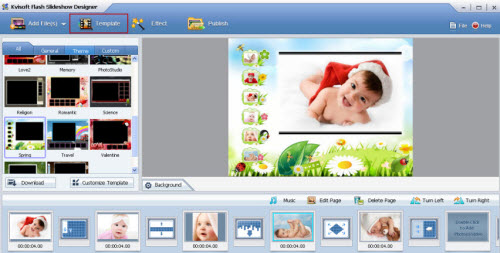
Flash Slideshow Designer is the professional flashslideshow maker and photo gallery software to create flash slideshows with music with stunning effects. With the all-in-one slideshow program, you could build your photo slideshow or flash photo gallery from digital photos or videos, then publish it as HTML, SWF, any video format, etc for embedding on your websites/blog or enjoying on iPad, iPhone, Android phones and other mobile devices.

Kvisoft Flash Slideshow Designer key features

Kvisoft Flash Slideshow Maker is an all-in-one slideshow maker to build flash image slideshows or 3D video galleries from digital photos, videos with music and effects. Then publish them as standalone SWF, Video, HTML, etc for sharing with others or playing on popular mobile devices.
Various import options:

    Add images (.jpg, .jpeg, png, .gif, .bmp) from your computer or online images.
    Add videos (.flv and .f4v) or online videos.
    Add multiple background music and define the start time and end time.

Slide design:

    Multiple built-in templates, including 3D flash templates and general slideshow templates for different use, such as website, wedding, Christmas, love and so on.
    Powerful theme designer to customize background color/image, player frame, thumbnails, and control bar.
    Save template for future using.
    For each slide, you are allowed to add text to the slide. You can also choose different font, color, size, font style for each line of text.

Other powerful features:

    Photo editing features: crop, rotate or edit photos by adding text, description, etc.
    It allows you add static and dynamic text for images. You could decorate your slides by add text, description, hyperlinks, effects, etc.
    Multiple preloader styles for your flash slideshow.
    Add logo and hyperlink to slideshow.

Screen Shots :

Download Here
 ===

 
အားလံုးအဆင္ေျပပါေစ

မေန႔ကတစ္ေယာက္ေတာင္းထားလိုတင္းေပးလုိက္တာ္ ။ Photo ေတြကိုsideshow ကစားခ်ငး္တယ္သူငယ္ခ်င္းအတြက္အထူေကာင္းပါတယ္ဗ်ာ။ၾကိဳက္တယ္ဆိုရင္ေအာက္မွာေဒါင္းႏိုင္
ပါတယ္ဗ်ာ။

ဒီsoftware ေတာ့ Editor လုပ္ထဲ့ထည့္မွာအလြင္ေကာင္းမြင္လွေသာ software ေကာင္းတစ္ခုပါျဖစ္တယ္
 ဓာတ္ပံုေတြ Editing လုပ္တာဝါသနာပါတဲ႔ သူငယ္ခ်င္းေတြအတြက္က်ေနာ္တင္ေပးလိုက္ပါတယ္ ၾကိဴက္တယ္ဆိုရင္ ေအာက္မွာေဒါင္းနုိင္ပါတယ္
Focus Photoeditor 6.5 is a powerful, easy-to-use image editor, that can be used to improve and correct all kind of digital photos and to produce graphics for the web, the home and the office. You can acquire digital pictures from file, from other applications, or with the help of a scanner or a digital camera and start to work with them immediately. Try the different automatic improvement functions and correct your photos in a matter of seconds. With its many image regulation abilities, that improve the pictures appearance, without loosing any quality, Focus can be used as a strong and professional tool by both beginner and advanced photographers.

Main features Of Focus Photoeditor 6.5:

• Loads fast, letting you immediately start to edit your pictures
• Does not eat up memory: memory consumption does not grow with the number of layers or the number of files opened
• Supports over 100 digital camera RAW formats
• Has the best set of Automatic Photo Corrections you could ask for
• Uses High Quality photo correction algorithms, which are also finely tuned
• Has a very easy to use Batch Processor with undo capabilities
• Supports powerful ways of creating Selections and has separate undo history for them
• Features great control over precise editing
• Provides many options to save and export files (optimized size and preview for all formats)
• Has a very comfortable picture browser: lets you rotate, make backup copies, copy & paste, print picture files in a sheet
• Offers many extras, like a web-album builder
• Improved interface
• Added support for newest cameras
• Improved speed of several editing and displaying operations
• Added some photo corrections and improved existing ones
• Added "Auto Crop"
• Paint Engine was improved, now follows the mouse movements more smoothly and precisely
• Improved "Quick Fix" correction
• Added Automatic and Manual "Dynamic Range" Correction
• Corrected many bugs
• Improved many other features

Download Here
===

အားလံုးပဲအဆင္ေျပႏိုင္ပါေစ

www.winhlaing.org


က်ြန္ေတာ္တင္သမွ်ပိုစ့္ေတြ Facebook ကေနရယူခ်င္တယ္ဆိုရင္  ဒီမွာ like ေပးခဲ့ပါေနာ္
မန္ဘာ၀င္ခဲ့ျခင္းျဖင့္ ပိုစ့္အသစ္တင္တိုင္း မိမိ Gmail ထဲကိုတိုက္ရိုက္ေရာက္ရွိမည္ျဖစ္ပါသည္။
ထို႔ေၾကာင့္မန္ဘာ၀င္ခဲ့ဖို႔ဖိတ္ေခၚပါတယ္။

ဒီsoftware ေတာ့ Editor လုပ္ထဲ့ထည့္မွာအလြင္ေကာင္းမြင္လွေသာ software ေကာင္းတစ္ခုပါျဖစ္တယ္
 ဓာတ္ပံုေတြ Editing လုပ္တာဝါသနာပါတဲ႔ သူငယ္ခ်င္းေတြအတြက္က်ေနာ္တင္ေပးလိုက္ပါတယ္ ၾကိဴက္တယ္ဆိုရင္ ေအာက္မွာေဒါင္းနုိင္ပါတယ္
Focus Photoeditor 6.5 is a powerful, easy-to-use image editor, that can be used to improve and correct all kind of digital photos and to produce graphics for the web, the home and the office. You can acquire digital pictures from file, from other applications, or with the help of a scanner or a digital camera and start to work with them immediately. Try the different automatic improvement functions and correct your photos in a matter of seconds. With its many image regulation abilities, that improve the pictures appearance, without loosing any quality, Focus can be used as a strong and professional tool by both beginner and advanced photographers.

Main features Of Focus Photoeditor 6.5:

• Loads fast, letting you immediately start to edit your pictures
• Does not eat up memory: memory consumption does not grow with the number of layers or the number of files opened
• Supports over 100 digital camera RAW formats
• Has the best set of Automatic Photo Corrections you could ask for
• Uses High Quality photo correction algorithms, which are also finely tuned
• Has a very easy to use Batch Processor with undo capabilities
• Supports powerful ways of creating Selections and has separate undo history for them
• Features great control over precise editing
• Provides many options to save and export files (optimized size and preview for all formats)
• Has a very comfortable picture browser: lets you rotate, make backup copies, copy & paste, print picture files in a sheet
• Offers many extras, like a web-album builder
• Improved interface
• Added support for newest cameras
• Improved speed of several editing and displaying operations
• Added some photo corrections and improved existing ones
• Added "Auto Crop"
• Paint Engine was improved, now follows the mouse movements more smoothly and precisely
• Improved "Quick Fix" correction
• Added Automatic and Manual "Dynamic Range" Correction
• Corrected many bugs
• Improved many other features

Download Here
===

အားလံုးပဲအဆင္ေျပႏိုင္ပါေစ

www.winhlaing.org


က်ြန္ေတာ္တင္သမွ်ပိုစ့္ေတြ Facebook ကေနရယူခ်င္တယ္ဆိုရင္  ဒီမွာ like ေပးခဲ့ပါေနာ္
မန္ဘာ၀င္ခဲ့ျခင္းျဖင့္ ပိုစ့္အသစ္တင္တိုင္း မိမိ Gmail ထဲကိုတိုက္ရိုက္ေရာက္ရွိမည္ျဖစ္ပါသည္။
ထို႔ေၾကာင့္မန္ဘာ၀င္ခဲ့ဖို႔ဖိတ္ေခၚပါတယ္။


ဒါေလး ကိုေတာ့ Facebook က က်ေနာ္ ရဲ႕ ညီေလး တေယာက္ကေတာင္းထားလို႔

ျပန္ရွာတင္ေပးလိုက္တာပါ။သူရွာခိုင္းတာကေတာ့ Key သက္သက္ပါပဲ။ Key ရွာရင္ နည္းနည္း ခက္လို႔

သူ႔ေဆာ့ဝဲ နဲ႔ သူ႔ ကီး အဆင္ေျပမယ့္ဟာေလးကိုပဲရွာေပးလိုက္ပါတယ္ ညီ

ဓါတ္ပံုေတြကို ျပဳ႕ျပင္ဖို႔အတြက္ပါ။အသံုးဝင္မယ္ဆိုရင္ေအာက္မွာ ဝင္ေဒါင္းသြားလို႔ရပါတယ္

Serial Key ကလည္း ဒီမွာ အလုပ္လုပ္ပါတယ္ ေအာက္မွာ screen shot က်ေနာ္ 

ယူထားေပးပါတယ္ခင္ဗ်ာ


DOWNLOAD


ကိုလတ္(ကြ်ဲဆင္း)


MKRdezign

Author Name

Contact Form

Name

Email *

Message *

Powered by Blogger.
Javascript DisablePlease Enable Javascript To See All Widget